Docs / Panel reference / Skeleton
Skeleton
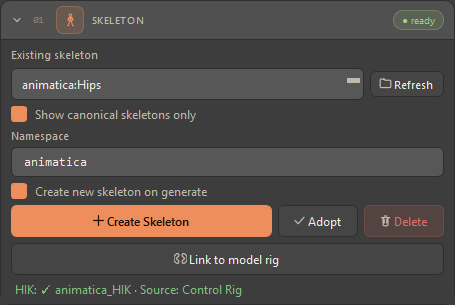
Card 01 — pick, create, adopt, link, or delete the rig the motion applies to, plus HIK characterization.
Chooses the rig the generated motion applies to. The header pill reads
not created or ready. FPS mirrors MoBu's scene transport automatically —
there is no manual FPS field.
| Control | Description |
|---|---|
| Existing skeleton + Refresh | Dropdown of skeleton roots in the scene. Refresh rescans. |
| Show canonical skeletons only | On by default — lists only plugin-created rigs. If the filtered list is empty, the tool falls back to showing all roots. |
| Namespace | Prefix applied to created joints (default animatica). Kept in lock-step with the timeline header's namespace field. |
| Create new skeleton on generate | When on, a fresh rig is built each time you generate. |
| Create Skeleton | Builds a new neutral rig in the scene — the canonical rig of the model selected in the Model card, read live from the server. See Which rig Create builds below. |
| Adopt | Makes the selected rig pipeline-ready: stores its current pose as the bind pose, plus hip height and namespace on its root. It does not mark the rig canonical, so an adopted rig stays out of the canonical-only filter. |
| Delete | Tears down the selected skeleton (with confirmation), including its HIK character and control rig. |
| Link to model rig | The HIK route in one click: builds the selected model's own skeleton, characterizes both rigs and drives the selected rig from the model's through HIK retargeting — the four manual steps behind Retarget route → HIK. Use it when your rig is not the model's and you want MotionBuilder's own retargeting rather than the server's. |
| HIK status | A colored line reports the HIK state: green = HIK present, amber = skeleton selected but no HIK (actionable), gray = nothing selected. |
In Compact layout the card keeps only the picker, Refresh, Create Skeleton and Delete; switch to Full to adopt or link a rig or to change the namespace.
#Which rig Create builds
The server can serve several models, and their canonical skeletons differ, so
Create Skeleton follows the Model picked in the
Model card: the tool reads that
model's canonical skeleton from the server's capabilities and builds that.
A model with its own joint naming — ardy-core-rp and its 27-joint layout —
gets its own rig.
When every joint name a model publishes is already in the built-in SOMA
rig, that rig is built instead: kimodo-soma-rp-v1.1's 30 joints are 30 of
SOMA's 77, so the built-in rig matches the model just as well by name and keeps
the fingers, eyes and jaw the model does not predict but you still pose and
skin. The Console names which rig was built and how many joints it has.
If the tool cannot get that far it falls back to the built-in SOMA rig and the Console warns with the reason — not logged in to Cloud, the server unreachable, no models advertised, or a canonical skeleton it cannot build. And if the model you selected is not one this server serves, the Console says so and Create uses the first model the server advertises.
One rig per namespace — If the namespace already holds the same rig, Create reuses it. If it holds a different one — the wrong joint count, or a root with another name — Create stops with an error naming what is there, what the new rig needs, and a free namespace to use instead (e.g.
animatica_ardy). Nothing is silently renamed or reused.
#Generating on a rig the model does not know
A rig that does not match the selected model — your own character, an adopted rig, or one Create built for another model — is not a problem: its hierarchy is sent with the request, the server retargets, and the motion comes back on that rig's joint names. What happens is decided by Retarget route in Settings, and the Console names the route and the reason before every such request.
Pins on a retargeted rig — Full Body and hand/foot pins are checked against the model's canonical joint names, not your rig's. A Full Body pose loses the joints named differently (they are dropped, with a Console warning), and a hand/foot pin on an unknown joint fails the request outright. The Console warns whenever a retargeted request carries either kind. Path constraints are not affected.
#HIK characterization & transferring motion to other rigs
Every SOMA character the plugin builds ships with a full HIK (HumanIK) characterization — the skeleton is already mapped to MotionBuilder's HumanIK definition, so it is a valid characterized actor out of the box, with no manual bone-mapping step. That's why the Skeleton card's HIK line reads green for plugin-created rigs, and why Bake to Control Rig works immediately.
Because the generated motion lives on a characterized rig, it can be transferred to any other characterized rig in the scene using MotionBuilder's standard HIK retargeting — regardless of the target rig's proportions. In Character Controls, set the destination character's Input / Source to the Animatica SOMA character; the destination rig then follows the generated motion live. Plot (bake) it onto the destination's skeleton or Control Rig to make it permanent. In short: generate once on the SOMA rig, then drive any of your production characters from the same take.
In practice — You never have to characterize the SOMA rig yourself — it arrives ready. Just make sure the target rig is also characterized in HIK, then retarget SOMA → target and plot. See workflow E for the full recipe.