Docs / Panel reference / Console
Console
Window 05 — a timestamped, color-coded log of everything the tool does.
A timestamped, color-coded log of everything the tool does. Levels: info, ok, warn, error, debug. Buttons let you Copy the full log to the clipboard or Clear it; the header pill counts the entries.
The Console is a window of its own: open it with Animatica → Open Console…. It is a native MotionBuilder tool, so it docks into your layout like any other panel. Nothing is lost while it is closed — the log is kept in the tool's state, and the window shows the whole history when opened.
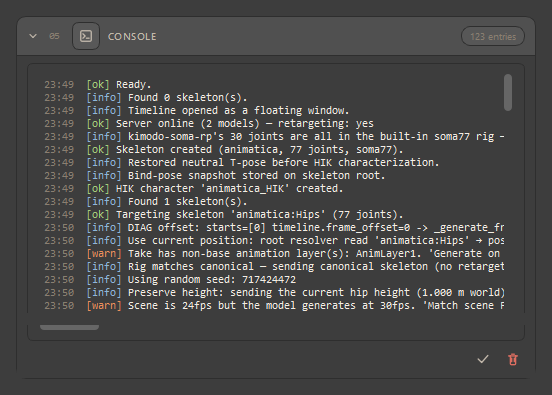
When something goes wrong, this is the first place to look. Read the last error line and Copy it. For deep issues, enable Settings → Debug to capture the request/response JSON.
#Lines worth knowing
| Line | What it means |
|---|---|
| Backward travel in take '…': longest run N frame(s), max angle …, measured M frame(s). | An info line after every take-mode apply: the tool measures how far the body faces away from its direction of travel on every frame it can measure. M says how many frames were measurable, so "0 frames backwards" on a clip standing still does not read as a pass. |
| Backward travel in take '…': the character walks facing away from its travel on frames A–B … | A warn line when the backward run lasts 5 frames or more. It names the take, the frame range (in your take's frames) and three ways out, cheapest first: regenerate on another seed; soften the turn on the Path or give it more frames; try Send real body context with hand/foot pins in Settings — which helped on some measured scenes, not all, and costs hand/foot pin accuracy. |
| pin_start: anchored rig start pose @ frame N … / pin_start: Full Body pin @ frame N already anchors the start pose; no anchor synthesized … | Whether the tool pinned the start pose for a later Full Body pin, or stood aside because you pinned the start frame yourself. See Constraints. |
| Model '…' is not served here / No retargeting available / already holds a … rig | Model and rig mismatches — each is a row in Troubleshooting. |