Docs / Panel reference / Model
Model
Card 00 — which model generates, what the server says about it, and the knobs only that model has.
The first card in the main window. It answers the first question of the workflow — which model generates — and the choice ripples down: it decides which rig Create Skeleton builds and which canonical skeleton your scene rig is compared against, so switching model can turn a matching rig into one that needs retargeting.
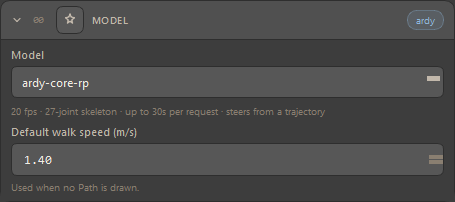
| Control | Description |
|---|---|
| Model | The generation model. Populated live from the server's capabilities, so the list is exactly what this server serves; until a server answers, only the remembered choice is listed. Default kimodo-soma-rp-v1.1. |
| Facts line | Read from the server for the selected model: native fps, joint count of its canonical skeleton, the longest request it accepts, and whether it steers from a trajectory. Before a connection it reads "Connect to a server to read this model's capabilities." |
| Default walk speed (m/s) | Shown for a trajectory-driven model only (ardy-core-rp today). Used when no Path is drawn: the model is told to travel at this speed. Default 1.4 m/s. |
| Header pill | The model family — kimodo or ardy. |
#Two model families
| Model | Skeleton | Steered by | Notes |
|---|---|---|---|
kimodo-soma-rp-v1.1 | 30 joints — every one of them is in the built-in 77-joint SOMA rig, so Create Skeleton builds SOMA | Text, plus every constraint type | The default. Generates a whole clip at once. |
ardy-core-rp | Its own 27-joint layout | A trajectory first — Path waypoints, or the default walk speed when none are drawn — then text | Hand/foot pins are not honoured by this model. |
Model, then skeleton — Pick the model before you press Create Skeleton. A rig built for one model is a foreign rig to the other, and the tool then follows the Retarget route in Settings rather than generating on it directly. Compact never hides this card.