 Blender
 Motion Builder
 3ds Max
Motion Trail. Reshape and retime the path.
Good motion moves in arcs, and the trail shows where it doesn't. It draws the paths of the hips, head, hands and feet. Drag a point to reshape the path, or hold Alt to slide it earlier or later.
Marionette is a Blender add-on for posing characters and fixing their animation by hand. Drag a hand, a foot, the hips or the head, and a pose model inside the add-on moves the rest of the body. It runs offline, on the rig you already use.
Each hand and foot, the hips and the head get a handle. Drag one and the pose model moves the rest of the body to follow it. A handle you have placed stays where you left it, so each drag adds to the pose.
The arm, shoulder and spine follow it, and the feet hold the floor.
The same sitting pose, made twice on the same character and sofa. Bone by bone with Blender's rotate tool took 44 rotations, each turning one bone around one axis. Marionette took 26 moves on its handles. At a typical 10 seconds a rotation and 3 a move, that is 7:20 against 1:18.
rotations with Blender's rotate tool, one bone and one axis each
moves on Marionette's handles: drags, and clicks with a typed turn1
from the target pose, on average2
Change one frame and Reach carries the change into the frames around it. The pose model re-poses each of them, so planted feet stay planted. It works on any keyed animation, yours or generated.
Good motion moves in arcs, and the trail shows where it doesn't. It draws the paths of the hips, head, hands and feet. Drag a point to reshape the path, or hold Alt to slide it earlier or later.
The onion skin shows the frames around the playhead. The zoetrope spreads them out side by side, so you can pose any of them without moving the playhead, and the frames on either side follow.
Paint over a trail to smooth the motion under the brush. The orange preview is exactly what the stroke will change.
Click a hand or a foot and set the stretch of frames it should hold. It stays on that spot, and the leg bends around it.
It lists the feet that slide or float, the bones that pop and the joints that shake, with the frames each one spans. Fix them one at a time or all at once. Its Energy slider makes the whole take snappier or calmer.
On Rigify, Auto-Rig Pro and CloudRig control rigs Marionette poses the FK controls and never moves an IK target or pole.
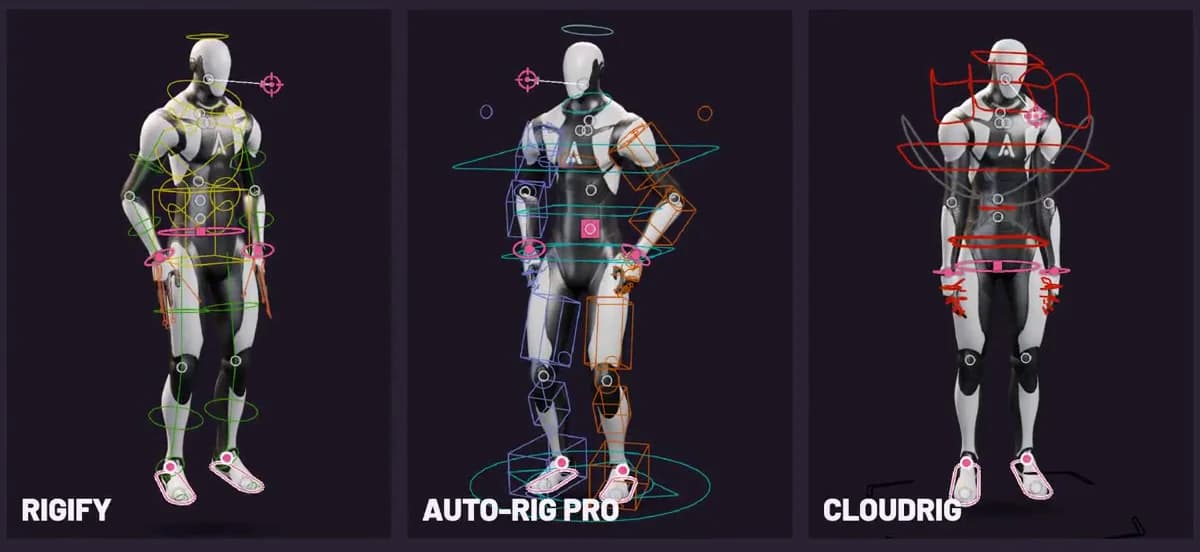
Mixamo, the UE5 mannequin, Character Creator, Daz, VRoid, 3ds Max Biped: found by the shape of the skeleton, nothing renamed.
Poses and edits land as ordinary FK keys on your rig. Nothing is added to it, and undo takes any edit back.
The Animatic character comes with the add-on, so you can try it before you open your own rig.
The pose model runs on your CPU inside Blender. No account, no GPU, and what you make with it is yours.
In launch week, October 21 to 28, the code on our Product Hunt page takes 50% off: $29.50.
Included with Pro paid yearly and with every Teams seat. See all pricing
Generating motion too? Animatica Choreographer is free, and Marionette edits the takes it makes.
Every clip on this page is a capture of the add-on in Blender 5.1, with the cursor or drag box drawn where the capture recorded it.