 Blender
 Motion Builder
 3ds Max
Autoposer. Drag a hand.
The body follows.
Posing runs on your machine and never uses a generation. See pricing
Runs inside

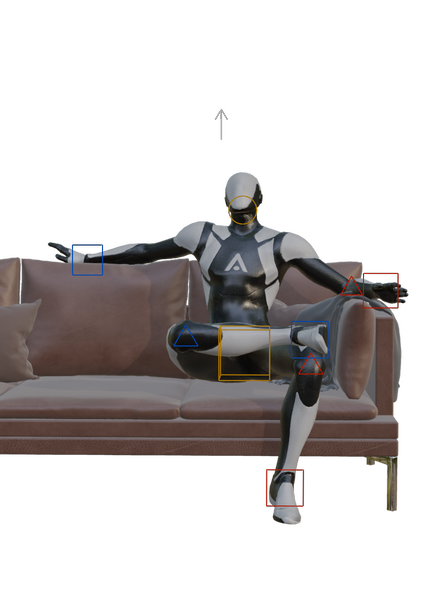
The Autoposer is a neural control rig. Put handles on the joints you care about, a hand where it should reach, the feet where they are planted, and it fills in everything you did not pin: the spine, the elbows, the shift of weight. An IK pass then puts each pinned joint exactly under its handle and keeps the feet out of the floor.
It runs inside Blender, on your CPU, so a drag re-solves the body in about fifteen milliseconds and nothing leaves your machine. It is built into the Blender plugin, and the poses you make with it are keys the next generated take is asked to hit.
- Made by
- Animatica
- Type
- Neural poser plus an IK refinement pass. One pose per call, no motion model
- Input
- Any number of handles: position, rotation or look-at, each with its own slack
- Output
- A full-body pose on your rig, keyed where you make it
- Speed
- About 15 ms a solve on a laptop CPU, fast enough to follow a drag
- Skeleton
- 30 joints (SOMA-30), mapped onto your rig's own bones
- Runs in
- Blender, on your machine. A one-off download of about 225 MB
- Weights
- Animatica-ai/autoposer on Hugging Face, with ONNX and PyTorch files
What Autoposer does.
- 01
Reach
Raise one hand, rest the other on the hip, shift the hips. The spine and shoulders follow, and the feet stay where they are pinned.
- 02
Crouch low
Sweep one leg out, fold the other under, put a hand to the floor and raise a fist. The knee handles turn the knees out; the rest of the body bends to fit.
- 03
Aim the head
Carry the look-at arrow around the character. The head and neck turn to follow it.
Pose a character of your own before you decide anything.
Get the pluginYour rig, as it is.
The model poses a 30-joint skeleton. Your character is almost certainly on something else, so the plugin works out which of its bones is the hips, each knee and each hand from the skeleton's shape, not from its bone names. Mixamo, Unreal and other humanoid rigs get handles without anything being renamed or rebuilt.
A rig standing in an A-pose rather than a T-pose, one exported Y-up or in centimetres, one with extra spine or twist bones: each is read as the body it is. If a bone is picked wrong, the Skeleton section of the Pose panel shows every joint and lets you choose another.
Handles, not bones.
A handle that is on says “put this joint here”. A handle that is off contributes nothing, and the model places that joint from what it knows about bodies. Each handle also carries its slack: tight, and the joint goes exactly where you put it; loose, and the model may overrule it to keep the pose natural.
Three handles is the fewest it was trained to answer well. Hips, hands, feet, head and a look-at are the default set, and you can add more. The handles follow the playhead, so you can scrub to any frame and pose there.
What it will not do.
It makes one pose at a time. There is no motion model inside it: a sequence of poses is consistent because the handles are, and the frames between your poses come from generation, not from the Autoposer.
It poses the body. Fingers get one of three hand shapes rather than being posed, and the face is left alone. On a control rig, such as Rigify or the Mixamo Control Rig, the deform bones follow the controls, so the Autoposer says so rather than starting; pose the deform skeleton instead. A body far outside ordinary proportions is posed less precisely. And it needs a humanoid: two arms, two legs and a head.
Questions.
- What is the Autoposer?
- A neural control rig built into the Animatica Blender plugin. You drag a few handles, a hand, a foot, the hips, and it poses the rest of the body around them.
- Does it work on Mixamo or Unreal characters?
- Yes. It finds the joints from the skeleton's shape rather than its bone names, so Mixamo, Unreal and other humanoid rigs work as they are, in a T-pose or an A-pose. Control rigs are the exception: pose their deform skeleton.
- Does it need an internet connection or a GPU?
- Neither, once it is set up. It needs a one-off download of about 225 MB, the model and its runtime, and after that it runs on your CPU inside Blender. Nothing you pose is sent anywhere.
- Does posing use my generations?
- No. The Autoposer runs on your machine, so posing is not metered. Generating motion between your poses is what uses generations.
- Can I use the model outside Blender?
- The weights are published on Hugging Face, as ONNX for running and PyTorch for research, with a model card that explains the inputs. The Blender plugin is the way it is meant to be used, and the one it is tuned for.
Pose your character by hand, not by bone.
Posing runs on your machine and never uses a generation. See pricing